The best free cursive fonts, previewed with your own words
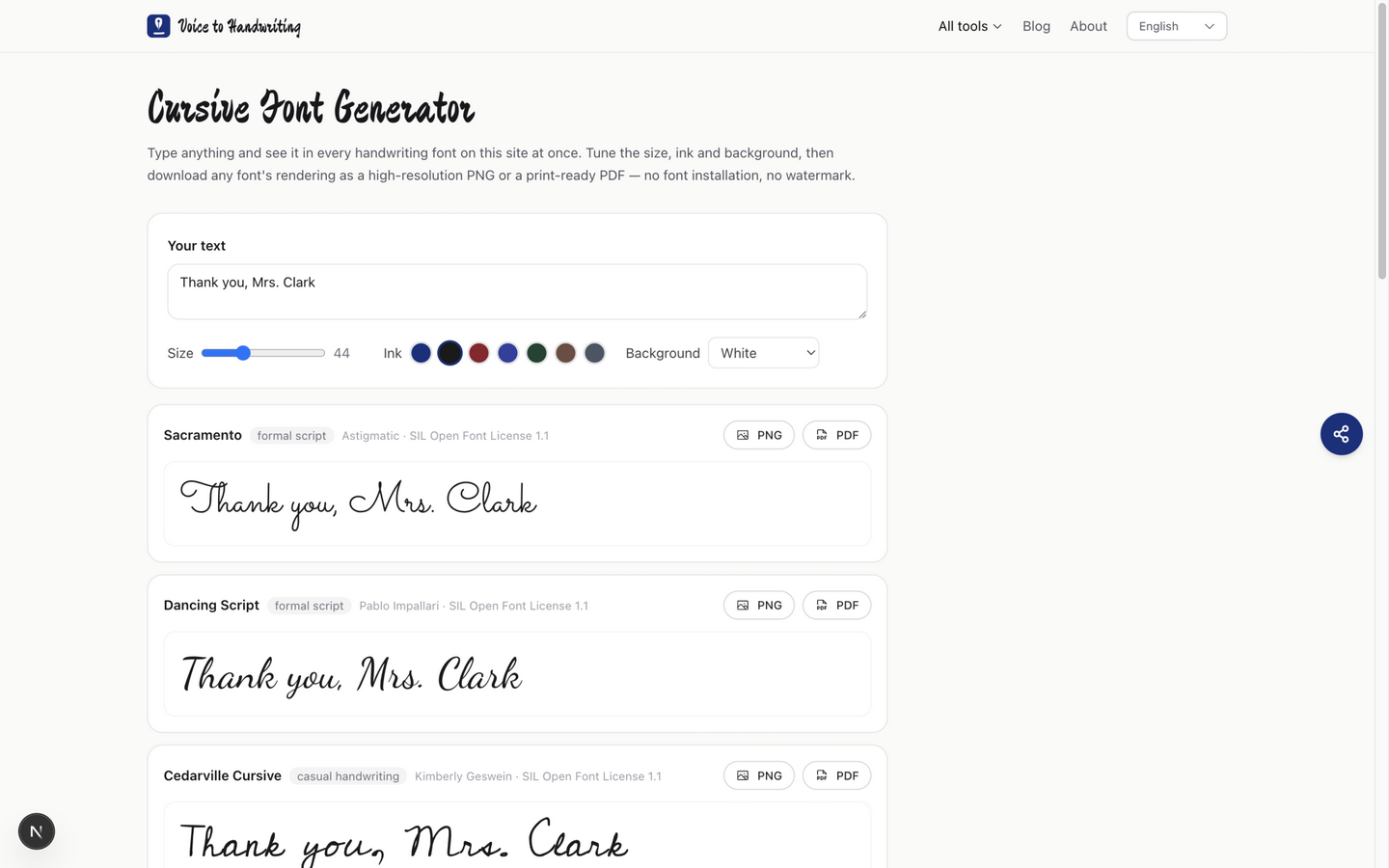
Thirteen handwriting fonts ship with the cursive font generator — all free, all open source, all licensed for commercial work. Seven are everyday practice and print hands; six are signature and formal scripts for names, invitations and tattoo drafts. Type your words in, and each font renders your line live. That's the whole trick most font sites skip — a font that looks dreamy with "Sample" on a download page can fall apart with your actual wording.
Seven practice fonts, and the job each one is for
| Font | Character | Reach for it when | Watch out for |
|---|---|---|---|
| Sacramento | Monoline teaching script, continuous entry and exit strokes | Practice sheets, anything that should look like neat classroom cursive | Thin strokes fade at small print sizes |
| Dancing Script | Bouncy formal script with real loops | Wedding signs, elegant cards, anything "celebration" | The loops demand space — tight line height crowds it |
| Cedarville Cursive | Based on a real teacher's everyday hand | Personal notes, letters, realistic handwriting effects | Casual enough that formal invitations want something else |
| Caveat | Quick pen handwriting, slightly condensed | Annotations, captions, journal-style graphics | Condensed rhythm reads "note to self", not "keepsake" |
| Indie Flower | Rounded, playful print | Kids' material, friendly labels | It's print, not cursive — no connecting strokes |
| Kalam | Neat, legible print handwriting | Instructions, lists, maximum readability | Same caveat: a print hand, useful mainly for comparison |
| Patrick Hand | Even, comic-neat print | Classroom headers, approachable body text | Distinctly casual |
Why are three print fonts on a cursive list? Because they earn their place as references. Set Wonderful in Sacramento, then in Kalam, and you can see exactly which strokes cursive adds — the entry connectors, the exit tails, the rebuilt b and r. That side-by-side is the fastest way I know to explain cursive to someone who insists it's "just fancy print".
Signature scripts, for names and invitations
The same page also carries six faces that are too showy for a practice sheet and exactly right for a name:
| Font | Character | Reach for it when |
|---|---|---|
| Great Vibes | High-contrast signature | A name, an email sign-off |
| Alex Brush | Formal brush signature | Invitations, place cards |
| Allura | Light connected script | Short headlines |
| Mr Dafoe | Loose, fast signature | Logos, tattoo wording |
| Pinyon Script | Thin, copperplate-like | Certificates, formal lines |
| Tangerine | Delicate formal script | A single word at large size |
These are still open-source fonts under the same license, credited on each row. They are not on the main handwriting tool: a full letter set in Great Vibes is hard to read.
How to preview them with your own words
- Open the cursive font generator and type your real text — the actual card message, not a test word. Multi-line works; each line keeps its breaks;
- Set the size slider to roughly how the text will be used: 30–40 for envelope addressing, 44–60 for card fronts, 70+ for signs. Bigger sizes expose the differences between fonts much more honestly;
- Switch the ink color (blue-black reads as "pen", vermilion as "festive") and the background — paper tone for cards, transparent if you're compositing into another design;
- Download the row you like as a PNG (high-resolution, transparent background if you picked transparent), an SVG with the font embedded, or a print-ready PDF. Use the SVG when a tattoo artist or a design file has to keep the letterforms without installing the font. It runs entirely in your browser — nothing uploads.
A parameter combo I use constantly for thank-you cards: Cedarville Cursive, size 48, blue-black on paper, then a second line in Kalam at size 30 for the printed name. Two fonts, one job each, done in a minute.
Licensing, without the fine print headache
Every font here carries the SIL Open Font License 1.1, and each row in the generator links to the font's author and its Google Fonts page: Great Vibes, Alex Brush and Allura (Robert E. Leuschke), Mr Dafoe (Alejandro Paul), Pinyon Script (Nicole Fally), Tangerine (Toshi Omagari), Sacramento (Astigmatic), Dancing Script (Pablo Impallari), Cedarville Cursive and Indie Flower (Kimberly Geswein), Caveat (Pavel Emelyanov), Kalam (Indian Type Foundry), Patrick Hand (Patrick Wagesreither). In plain terms: free for personal and commercial use — printed cards, wedding signage, products, logo drafts. If you want the font files themselves for design software, download them from the linked pages rather than hunting through aggregator sites, where the license files often go missing.
One distinction worth knowing: images you export are yours to use; the font files stay under their license (redistribution and selling the fonts themselves are the parts OFL restricts).
This versus "cursive text you can paste"
If you want letters that look like cursive inside an Instagram bio or a Discord nickname, that's a different tool: the cursive text generator maps your text to Unicode script symbols you can copy and paste as plain text. It can't be printed well and screen readers stumble on it. For anything on paper — or anything you'd want to look genuinely handwritten — real fonts like these win, and the cursive writing generator adds realistic pen stroking for full pages.
And if your goal is practicing cursive rather than using it, the interactive cursive alphabet shows every letter with stroke guides, and the worksheets generator prints traceable rows of any word list.
Tested, with honest limitations
Tested on desktop Chrome (in-app browser), macOS, October 2026: live preview across all thirteen fonts, size/ink/background controls, and the export pipeline — the PNG renderer produces a clean 2× canvas, and the SVG embeds the Latin subset of the font. Limits worth knowing: these fonts cover the Latin alphabet, so Chinese, Japanese and Korean text needs the site's CJK handwriting fonts instead; PDF export always renders a white background (transparency is PNG-only, and SVG when you pick transparent); and the previews show real open-source fonts, not licensed school scripts like Zaner-Bloser — Sacramento is the closest free stand-in for D'Nealian-style teaching, not an official match.
People also ask
- What is the most realistic cursive font here? Cedarville Cursive — it's based on a real teacher's handwriting, so the letterforms carry natural inconsistency. Dancing Script looks more "professional" but more designed.
- Are cursive fonts free for commercial use? The thirteen on this site are, under SIL OFL 1.1. Always check per font: download aggregators mix licensed, demo and personal-use files under one roof.
- Which font is closest to what schools teach? Sacramento for the D'Nealian-style continuous strokes; see the cursive alphabet chart to compare letterforms with stroke guides.
- Can I use these fonts without installing anything? Yes — that's what the generator on this page does: your text renders in the browser and exports as PNG, SVG or PDF directly.